
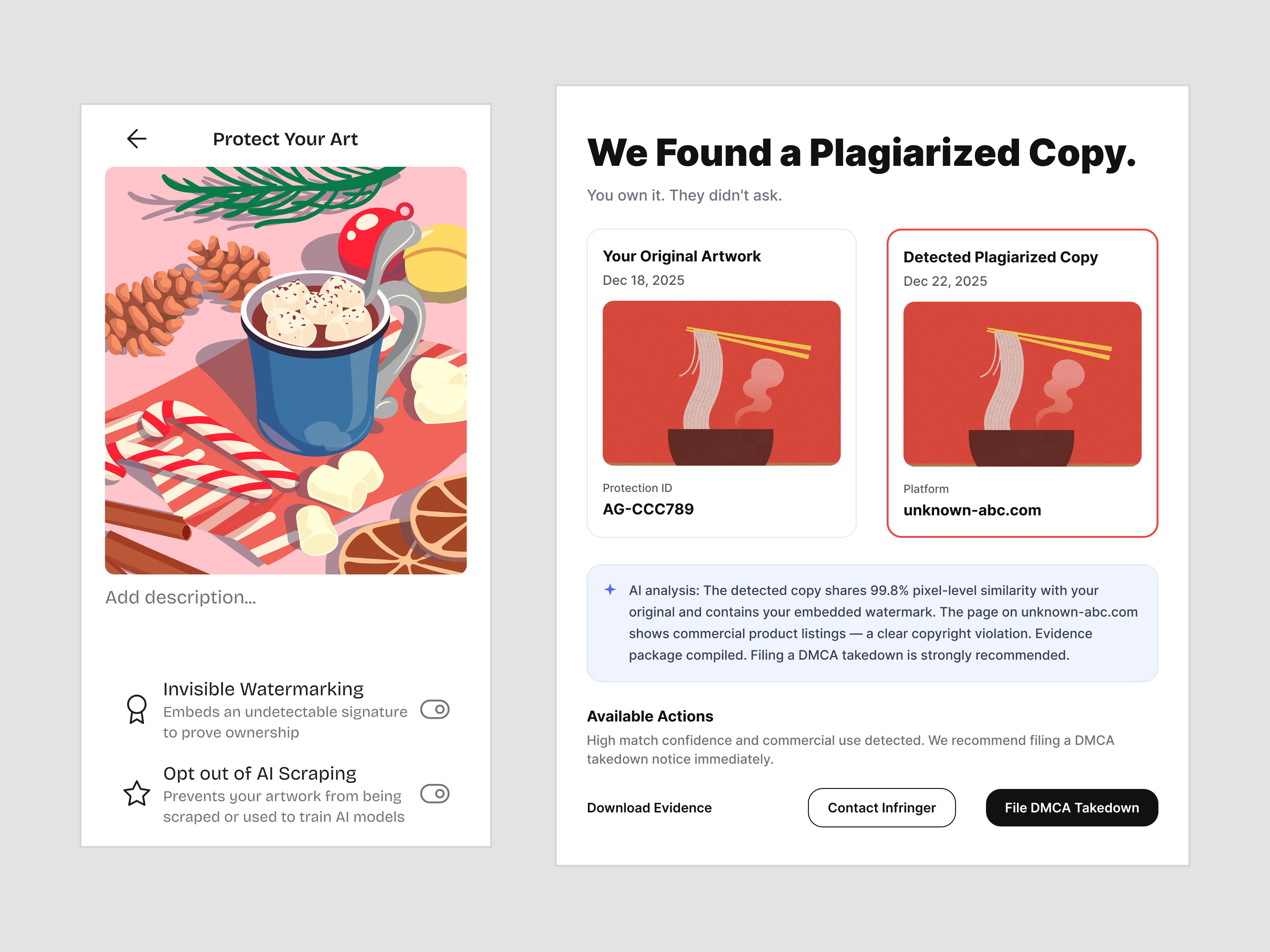
Designing a 0→1 Art Protection AI System
Defined the MVP and designed one-click workflows that helped users move from plagiarism detection to enforcement action.
scope
UX Research · User Interviews · Feature Prioritization · UX Design · Usability Testing
my role
Lead Product Designer leading a team of 5.
SUMMARY
ArtGuard.ai is an AI-powered platform that helps digital artists protect their work, detect misuse, and take action against plagiarism. As the 0→1 lead designer, I led research, product strategy, and end-to-end UX, informed by 20+ artist interviews and competitive research. I designed the core protection, monitoring, and enforcement workflows, turning a complex and stressful problem into a simple, action-focused experience built around trust, transparency, and control.
↑ 82%
Submission Completion
↓ 22 mins → under 3 mins
Time to Submit Enforcement Action
The challenge
Artists could detect stolen artwork but struggled to protect it or take action. Confusing AI workflows, legal complexity, and low trust caused users to abandon the product before completing key tasks.
Research & Discovery
Conducted competitive analysis, interviewed 20+ artists, reviewed 10+ industry studies, and tested early concepts to understand pain points across onboarding and copyright enforcement.
Key Insight 1
Artists needed clarity and action
Key Insight 2
Artists needed a simple, trustworthy workflow
Design, Strategy And The Solution
Accessibility features can feel stigmatizing when separated from the main experience. We reframed them as adaptive settings, such as adjustable typography, focus modes, text-to-speech, and multisensory formats, available to everyone by default. This universal design approach supported diverse learning needs and made longer learning sessions more comfortable.
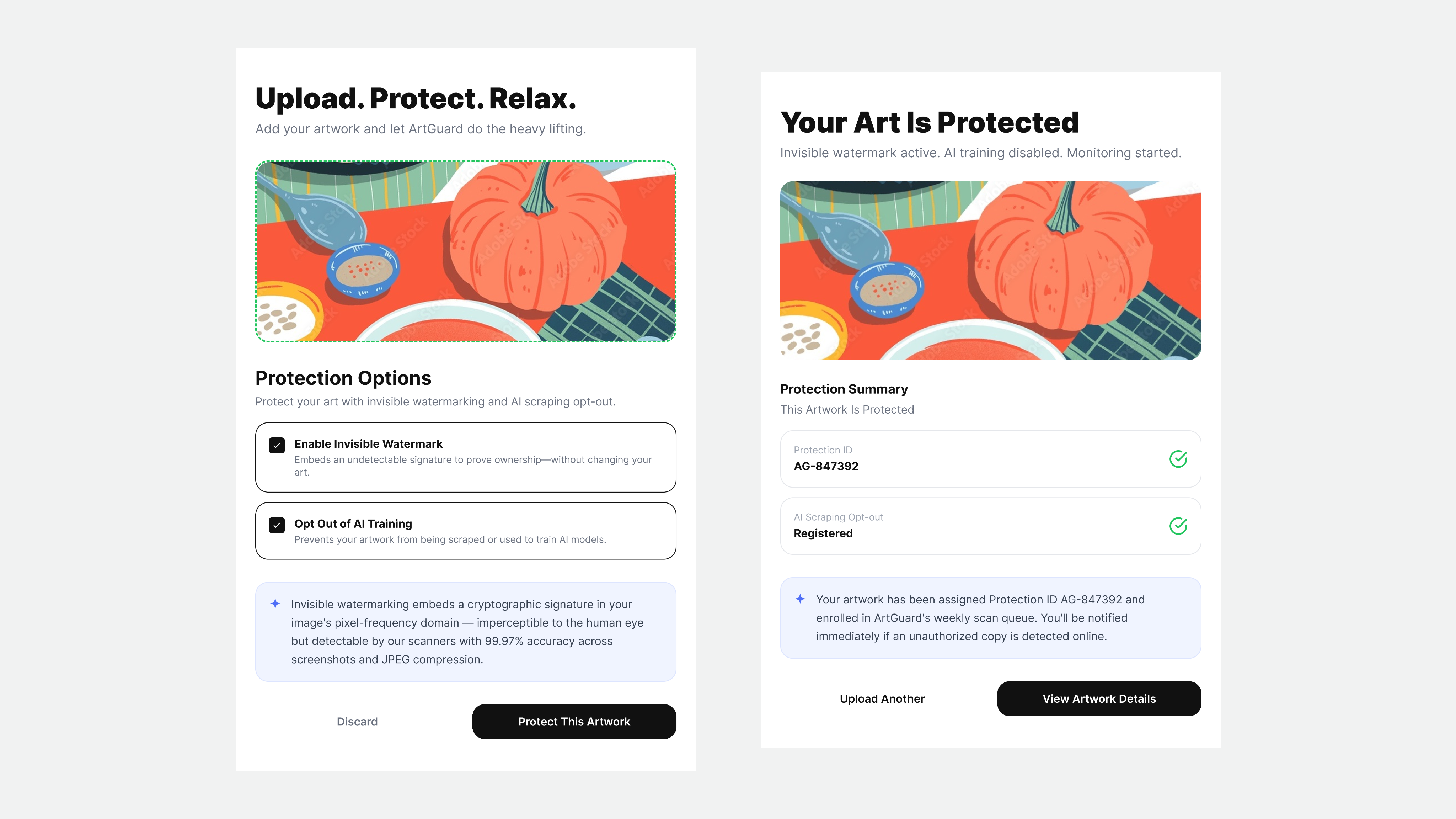
Solving Drop-off During Art Upload
Artists were abandoning the upload flow because they didn’t understand what AI fingerprinting did to their artwork or how their files would be used. Interviews and usability testing showed that trust was the main barrier. Artists wanted to see what the system was doing before giving it access to their work. I made transparency part of the upload experience, introducing an explainable AI flow, fingerprint preview, and clear control confirmations before artists committed their work.
Key Design Decisions
Instead of hiding the AI process in the background, I showed artists what was happening and why.
Trade-offs & Constraints
More explanation could make onboarding longer, so I focused only on what artists needed to make confident decisions.
Results
↑ 33% → 78% Upload Completion
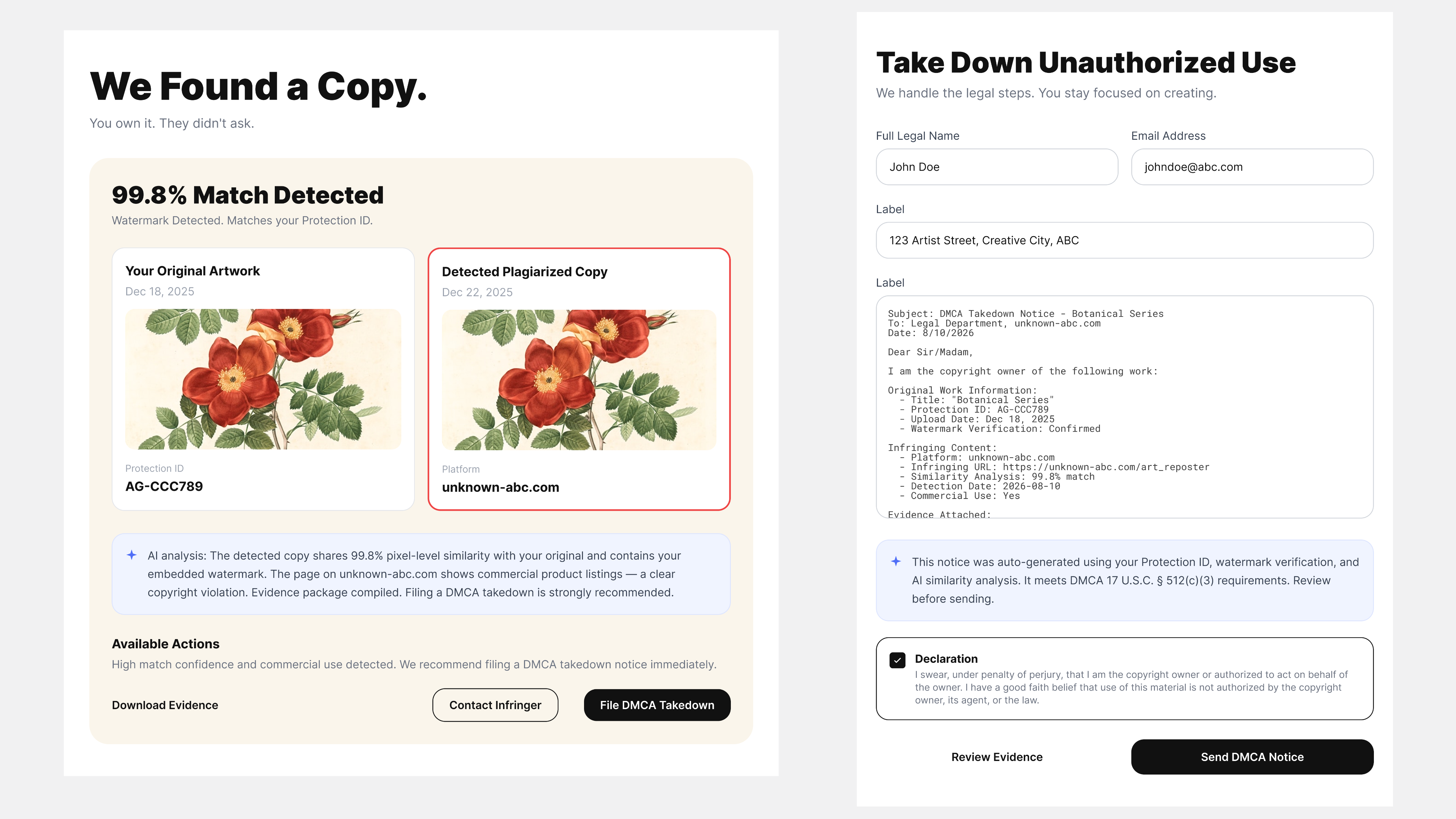
Turning Complex Legal Workflows into One-Click Action
Research showed that artists knew when their work was misused but often stopped before taking action. The main barrier was not awareness, but the complexity of gathering evidence, understanding legal requirements, and navigating platform-specific processes. I redesigned it into a 3-step guided workflow that prepared ownership evidence, simplified legal language, and routed requests to the right platform.
Key Design Decisions
Line-by-line reading. Reduced competing information on screen.
Trade-offs & Constraints
Legal requirements prevented full automation, so I designed a semi-automated human-in-loop flow.
Results
↓ Time-to-submission dropped from 22 mins → under 3 mins.
key takeaway
Clear explanations, simple workflows, and giving users confidence at every step made the experience far more effortless than adding more features.
Designing a 0→1 Art Protection AI System
Defined the MVP and designed one-click workflows that helped users move from plagiarism detection to enforcement action.
scope
UX Research · User Interviews · Feature Prioritization · UX Design · Usability Testing
my role
Lead Product Designer leading a team of 5.
SUMMARY
ArtGuard.ai is an AI-powered platform that helps digital artists protect their work, detect misuse, and take action against plagiarism. As the 0→1 lead designer, I led research, product strategy, and end-to-end UX, informed by 20+ artist interviews and competitive research. I designed the core protection, monitoring, and enforcement workflows, turning a complex and stressful problem into a simple, action-focused experience built around trust, transparency, and control.
↑ 82%
Submission Completion
↓ 22 mins → under 3 mins
Time to Submit Enforcement Action
The challenge
Artists could detect stolen artwork but struggled to protect it or take action. Confusing AI workflows, legal complexity, and low trust caused users to abandon the product before completing key tasks.
Research & Discovery
Conducted competitive analysis, interviewed 20+ artists, reviewed 10+ industry studies, and tested early concepts to understand pain points across onboarding and copyright enforcement.
Key Insight 1
Artists needed clarity and action
Key Insight 2
Artists needed a simple, trustworthy workflow
Design, Strategy And The Solution
Accessibility features can feel stigmatizing when separated from the main experience. We reframed them as adaptive settings, such as adjustable typography, focus modes, text-to-speech, and multisensory formats, available to everyone by default. This universal design approach supported diverse learning needs and made longer learning sessions more comfortable.
Solving Drop-off During Art Upload
Artists were abandoning the upload flow because they didn’t understand what AI fingerprinting did to their artwork or how their files would be used. Interviews and usability testing showed that trust was the main barrier. Artists wanted to see what the system was doing before giving it access to their work. I made transparency part of the upload experience, introducing an explainable AI flow, fingerprint preview, and clear control confirmations before artists committed their work.
Key Design Decisions
Instead of hiding the AI process in the background, I showed artists what was happening and why.
Trade-offs & Constraints
More explanation could make onboarding longer, so I focused only on what artists needed to make confident decisions.
Results
↑ 33% → 78% Upload Completion
Turning Complex Legal Workflows into One-Click Action
Research showed that artists knew when their work was misused but often stopped before taking action. The main barrier was not awareness, but the complexity of gathering evidence, understanding legal requirements, and navigating platform-specific processes. I redesigned it into a 3-step guided workflow that prepared ownership evidence, simplified legal language, and routed requests to the right platform.
Key Design Decisions
Line-by-line reading. Reduced competing information on screen.
Trade-offs & Constraints
Legal requirements prevented full automation, so I designed a semi-automated human-in-loop flow.
Results
↓ Time-to-submission dropped from 22 mins → under 3 mins.
key takeaway
Clear explanations, simple workflows, and giving users confidence at every step made the experience far more effortless than adding more features.
Designing a 0→1 Art Protection AI System
Defined the MVP and designed one-click workflows that helped users move from plagiarism detection to enforcement action.
scope
UX Research · User Interviews · Feature Prioritization · UX Design · Usability Testing
my role
Lead Product Designer leading a team of 5.
SUMMARY
ArtGuard.ai is an AI-powered platform that helps digital artists protect their work, detect misuse, and take action against plagiarism. As the 0→1 lead designer, I led research, product strategy, and end-to-end UX, informed by 20+ artist interviews and competitive research. I designed the core protection, monitoring, and enforcement workflows, turning a complex and stressful problem into a simple, action-focused experience built around trust, transparency, and control.
↑ 82%
Submission Completion
↓ 22 mins → under 3 mins
Time to Submit Enforcement Action
The challenge
Artists could detect stolen artwork but struggled to protect it or take action. Confusing AI workflows, legal complexity, and low trust caused users to abandon the product before completing key tasks.
Research & Discovery
Conducted competitive analysis, interviewed 20+ artists, reviewed 10+ industry studies, and tested early concepts to understand pain points across onboarding and copyright enforcement.
Key Insight 1
Artists needed clarity and action
Key Insight 2
Artists needed a simple, trustworthy workflow
Design, Strategy And The Solution
I followed an iterative 0→1 product design process that combined user research, rapid prototyping, usability testing, and continuous feedback. The strategy was to reduce friction, build trust in AI, and help artists move from discovering misuse to confidently taking action in the fewest possible steps. The final experience simplified a complex journey into a clear, guided workflow.
Solving Drop-off During Art Upload
Artists were abandoning the upload flow because they didn’t understand what AI fingerprinting did to their artwork or how their files would be used. Interviews and usability testing showed that trust was the main barrier. Artists wanted to see what the system was doing before giving it access to their work. I made transparency part of the upload experience, introducing an explainable AI flow, fingerprint preview, and clear control confirmations before artists committed their work.
Key Design Decisions
Instead of hiding the AI process in the background, I showed artists what was happening and why.
Trade-offs & Constraints
More explanation could make onboarding longer, so I focused only on what artists needed to make confident decisions.
Results
↑ 33% → 78% Upload Completion
Turning Complex Legal Workflows into One-Click Action
Research showed that artists knew when their work was misused but often stopped before taking action. The main barrier was not awareness, but the complexity of gathering evidence, understanding legal requirements, and navigating platform-specific processes. I redesigned it into a 3-step guided workflow that prepared ownership evidence, simplified legal language, and routed requests to the right platform.
Key Design Decisions
Line-by-line reading. Reduced competing information on screen.
Trade-offs & Constraints
Legal requirements prevented full automation, so I designed a semi-automated human-in-loop flow.
Results
↓ Time-to-submission dropped from 22 mins → under 3 mins.
key takeaway
Clear explanations, simple workflows, and giving users confidence at every step made the experience far more effortless than adding more features.